Proxmox
Proxmox VE: Your Ultimate Virtualization Solution
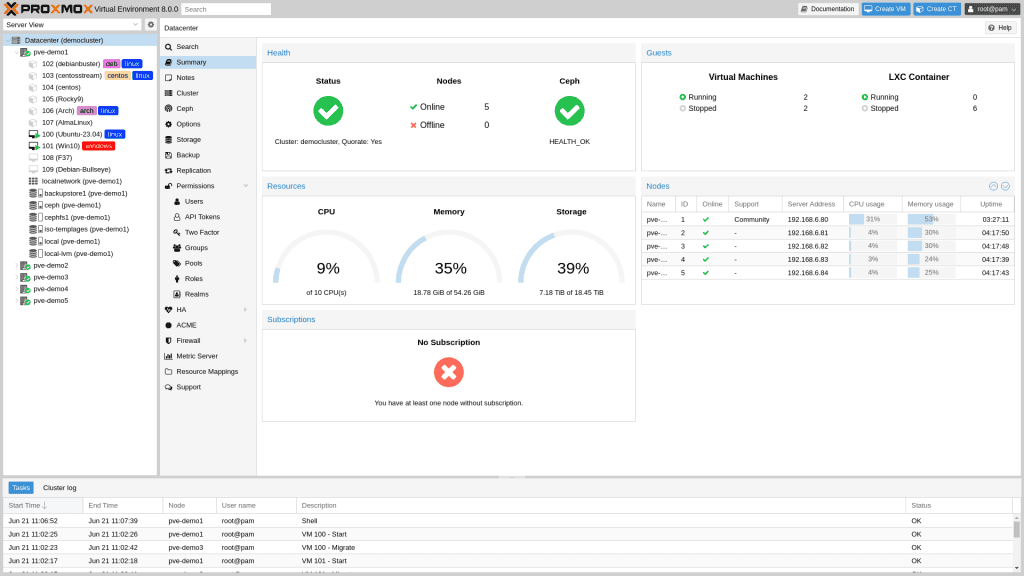
Proxmox VE stands as a leading open-source virtualization platform, empowering businesses and individuals to efficiently manage their server infrastructure. This robust hypervisor solution integrates KVM virtual machines and LXC containers, offering unparalleled flexibility. Furthermore, Proxmox virtualization simplifies complex datacenter management tasks, providing a user-friendly web interface. Consequently, users can effortlessly deploy, monitor, and scale their virtual environments. For those seeking a powerful and cost-effective server virtualization option, Proxmox VE delivers comprehensive tools for high availability and disaster recovery, making it an indispensable asset for modern IT setups.
Proxmox Virtual Environment (Proxmox VE) is a comprehensive open-source server virtualization management solution. It seamlessly integrates the KVM hypervisor for virtual machines and LXC for containers, alongside software-defined storage and networking functionalities, all managed from a single, intuitive web-based interface. Built upon the robust Debian Linux distribution, Proxmox VE provides a powerful and flexible foundation for consolidating server workloads and building highly available, fault-tolerant virtualization clusters.
The core philosophy of Proxmox VE is to offer a powerful, yet easy-to-manage, open-source alternative to proprietary virtualization solutions, empowering users with full control and transparency over their infrastructure. Its architecture leverages a custom-tuned Linux kernel, ensuring optimal performance and scalability for diverse workloads. The unified management interface simplifies the administration of virtualized environments, making it suitable for deployments ranging from small businesses to large data centers.
Users benefit from a rich feature set including live migration, integrated backup/restore, a firewall, and support for various storage technologies like ZFS and Ceph. The active community and available commercial support subscriptions further enhance its appeal, providing a reliable and cost-effective solution for modern virtualization needs.
 Proxmox Virtual Environment
📌 Overview & Description
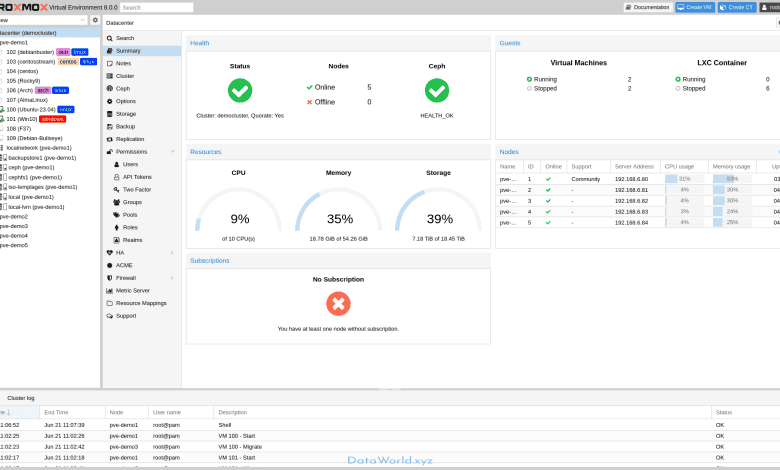
Proxmox Virtual Environment (Proxmox VE) is a comprehensive open-source server virtualization management solution. It seamlessly integrates the KVM hypervisor for virtual machines and LXC for containers, alongside software-defined storage and networking functionalities, all managed from a single, intuitive web-based interface. Built upon the robust Debian Linux distribution, Proxmox VE provides a powerful and flexible foundation for consolidating server workloads and building highly available, fault-tolerant virtualization clusters.
The core philosophy of Proxmox VE is to offer a powerful, yet easy-to-manage, open-source alternative to proprietary virtualization solutions, empowering users with full control and transparency over their infrastructure. Its architecture leverages a custom-tuned Linux kernel, ensuring optimal performance and scalability for diverse workloads. The unified management interface simplifies the administration of virtualized environments, making it suitable for deployments ranging from small businesses to large data centers.
Users benefit from a rich feature set including live migration, integrated backup/restore, a firewall, and support for various storage technologies like ZFS and Ceph. The active community and available commercial support subscriptions further enhance its appeal, providing a reliable and cost-effective solution for modern virtualization needs.
⚙️ Technical Specifications & Release Timeline
💻 System Requirements (Minimum vs Recommended)
| Hardware Component | Minimum Requirements | Recommended Requirements |
|---|---|---|
|
Processor (CPU)
|
64-bit CPU (Intel EMT64 or AMD64) | Multi-core CPU (Intel Xeon or AMD EPYC) with virtualization support (Intel VT/AMD-V) |
|
Memory (RAM)
|
2 GB (plus 1 GB for every TB of storage if ZFS is used) | 16 GB or more (depending on VM/container workload, plus ZFS overhead) |
|
Storage Space
|
8 GB (for OS installation) | SSD (for OS and VM/container storage), RAID configuration recommended |
|
Graphics Card (GPU)
|
Standard VGA compatible card (for console access) | Standard VGA compatible card (for console access, not critical for headless server) |
✅ What is Supported
- KVM-based virtual machines
- LXC containers
- Software-defined storage (ZFS, Ceph)
- High Availability (HA) clustering
- Live migration of VMs/containers
- Integrated firewall
- Backup and restore functionality
- Network bridging and VLANs
🚀 Best Supported For (Ideal Use Cases)
- Consolidating server workloads onto fewer physical machines
- Building highly available and fault-tolerant virtualization clusters
- Deploying and managing Linux and Windows virtual machines
- Containerizing applications with LXC for efficiency
- Creating a robust and scalable private cloud infrastructure
- Utilizing ZFS for advanced data integrity and snapshotting
- Cost-effective enterprise virtualization solutions
- Environments requiring open-source flexibility and control
🌟 Key Features & Advantages
OS Screenshots