Deepin
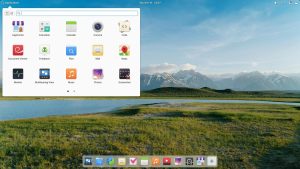
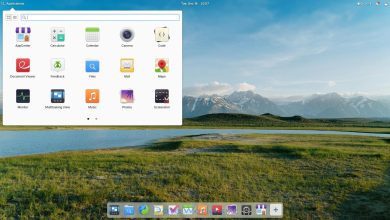
Deepin is a Linux distribution committed to providing an elegant, user-friendly, and secure operating system for global users. Originating from China, it is developed by Deepin Technology Co., Ltd. (Wuhan Deepin Technology Co., Ltd.). Deepin distinguishes itself with its self-developed desktop environment, the Deepin Desktop Environment (DDE), which is known for its aesthetic appeal, intuitive design, and rich functionality. The distribution aims to bridge the gap between traditional desktop operating systems and modern user expectations, offering a seamless and visually appealing experience.
Deepin’s core philosophy revolves around user experience and ease of use, making it an attractive option for both Linux newcomers and experienced users. It integrates a wide array of pre-installed applications, including a custom app store, a robust control center, and various productivity tools, all designed with a consistent visual language. Built upon a Debian stable branch, Deepin leverages the stability and vast software repositories of Debian while adding its unique desktop environment and a suite of custom applications, ensuring a reliable and feature-rich computing environment. Its architecture is based on the Linux kernel, providing a monolithic kernel structure.
 https://www.deepin.org/
📌 Overview & Description
Deepin is a Linux distribution committed to providing an elegant, user-friendly, and secure operating system for global users. Originating from China, it is developed by Deepin Technology Co., Ltd. (Wuhan Deepin Technology Co., Ltd.). Deepin distinguishes itself with its self-developed desktop environment, the Deepin Desktop Environment (DDE), which is known for its aesthetic appeal, intuitive design, and rich functionality. The distribution aims to bridge the gap between traditional desktop operating systems and modern user expectations, offering a seamless and visually appealing experience.
Deepin's core philosophy revolves around user experience and ease of use, making it an attractive option for both Linux newcomers and experienced users. It integrates a wide array of pre-installed applications, including a custom app store, a robust control center, and various productivity tools, all designed with a consistent visual language. Built upon a Debian stable branch, Deepin leverages the stability and vast software repositories of Debian while adding its unique desktop environment and a suite of custom applications, ensuring a reliable and feature-rich computing environment. Its architecture is based on the Linux kernel, providing a monolithic kernel structure.
⚙️ Technical Specifications & Release Timeline
💻 System Requirements (Minimum vs Recommended)
| Hardware Component | Minimum Requirements | Recommended Requirements |
|---|---|---|
|
Processor (CPU)
|
Intel Pentium IV 2GHz or equivalent | Intel Core i3/i5/i7 (8th Gen or newer) or equivalent AMD Ryzen processor |
|
Memory (RAM)
|
4 GB | 8 GB |
|
Storage Space
|
64 GB | 128 GB SSD |
|
Graphics Card (GPU)
|
DirectX 9 compatible GPU with 1GB VRAM, 1024x768 display | DirectX 11/12 compatible GPU with 2GB+ VRAM, 1920x1080 display |
✅ What is Supported
- Comprehensive desktop environment (DDE) with custom applications
- Extensive software repository and Deepin App Store
- Multi-language support for global users
- Hardware acceleration for graphics and media
- Virtualization support (e.g., KVM, VirtualBox)
- Containerization technologies (e.g., Docker, Podman)
- Advanced power management and system optimization tools
- Robust security features including firewall and privacy controls
🚀 Best Supported For (Ideal Use Cases)
- Users seeking a visually appealing and intuitive Linux desktop
- Individuals transitioning from Windows or macOS to Linux
- Educational institutions and students requiring a stable and feature-rich OS
- Developers and programmers needing a robust and customizable environment
- Multimedia creators and designers leveraging powerful desktop tools
- General home and office users prioritizing ease of use and aesthetics
- Users in the Chinese ecosystem due to strong local integration
- Those who appreciate a curated and integrated software experience
🌟 Key Features & Advantages
OS Screenshots